Better Contacts
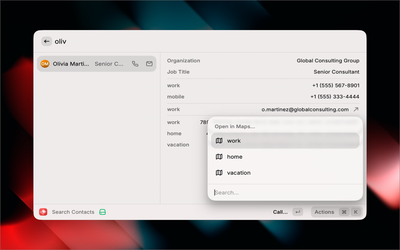
At the end of 2025, I submitted my second Raycast extension for review: Better Contacts. It lets you search through hundreds of contacts instantly and take action—call, email, get directions—all from Raycast, which then jumps you out to where you need to go for every action on macOS.

Honestly, I'm surprised this didn't exist already. Raycast has been around for years, yet there was no proper contacts extension. Until now.
What it does
Better Contacts gives you instant access to your macOS contacts from Raycast:
| Action | Shortcut | Description |
|---|---|---|
| Call | ↩ | Call any phone number |
| Compose in your default mail app | ||
| Open in Maps | ⌘M | Get directions to any address |
| Copy phone | ⌘⇧P | Copy phone number to clipboard |
| Copy email | ⌘⇧E | Copy email address to clipboard |
| Open in Contacts | Jump to native Contacts app | |
| Refresh | ⌘R | Force sync from Contacts.app |
| Delete | ⌃X | Remove contact with confirmation |
When a contact has multiple addresses, phone numbers, or emails, the extension shows a submenu so you can pick the right one.
Why I built it
This one was different from my first extension. PulseMCP was a straightforward API client. Better Contacts required solving a real performance problem, which led me down a rabbit hole of Swift CLIs, SQLite caching, and secure binary distribution.
The problem with contacts
Raycast extensions run in a JavaScript sandbox. That's great for portability, but accessing macOS Contacts means going through Apple's Contacts framework—which is Objective-C/Swift territory.
The naive approach would be to shell out to osascript with AppleScript or use JXA (JavaScript for Automation). I tried that first. It works, but it's slow. With 700+ contacts, the initial load took several seconds. Every. Single. Time.
That's not acceptable for a launcher. The whole point is instant access.
The architecture
The solution was a two-part system:
- A Swift CLI helper that syncs contacts to a local SQLite database
- A TypeScript frontend that reads directly from SQLite for instant search
The Swift helper (contacts-helper) handles all the heavy lifting:
- Syncing contacts from Apple's Contacts framework to SQLite
- Fetching individual contact details with thumbnails
- Deleting contacts (with proper cache invalidation)
The TypeScript side never touches the Contacts framework directly. It just reads from the SQLite cache, which is fast—sub-millisecond queries even with hundreds of contacts.
┌─────────────────┐     ┌──────────────────┐     ┌─────────────┐
│  Raycast UI     │────▶│  SQLite Cache    │◀────│  Swift CLI  │
│  (TypeScript)   │     │  (contacts.db)   │     │  (helper)   │
└─────────────────┘     └──────────────────┘     └─────────────┘
                                                        │
                                                        ▼
                                                ┌─────────────┐
                                                │   Contacts  │
                                                │  Framework  │
                                                └─────────────┘
The caching strategy
The cache lives at ~/Library/Application Support/better-contacts/contacts.db. It auto-refreshes every 5 minutes, but you can also force a sync with ⌘R.
The SQLite schema is normalized—separate tables for contacts, phone numbers, email addresses, and postal addresses with proper foreign keys and indexes:
CREATE TABLE contacts (
    identifier TEXT PRIMARY KEY,
    given_name TEXT NOT NULL DEFAULT '',
    family_name TEXT NOT NULL DEFAULT '',
    -- ... other fields
    thumbnail BLOB
);

CREATE TABLE phone_numbers (
    id INTEGER PRIMARY KEY AUTOINCREMENT,
    contact_id TEXT NOT NULL,
    label TEXT,
    value TEXT NOT NULL,
    FOREIGN KEY (contact_id) REFERENCES contacts(identifier) ON DELETE CASCADE
);

CREATE INDEX idx_contacts_name ON contacts(given_name, family_name);
This means searching by name, email, or phone number is all indexed. The extension feels instant because it is instant.
The distribution problem
Here's where it got interesting. Raycast extensions are distributed through their store—just JavaScript, no native binaries. But my extension needs a native binary.
The solution: download the binary at runtime.
On first launch, the extension:
- Downloads the universal binary from GitHub Releases
- Verifies the SHA256 checksum
- Makes it executable
- Stores the version for future update checks
const BINARY_VERSION = "v0.0.1";
const BINARY_SHA256 = "7a110a299ae4f92719cea16af8bbbd62c19a77007d3b9cac971c13f82e2adcba";

async function ensureBinary(): Promise<string> {
  // Check if binary exists and matches expected version/checksum
  if (existsSync(binaryPath) && verifyChecksum(binaryPath)) {
    return binaryPath;
  }

  // Download from GitHub Releases
  await downloadFile(DOWNLOAD_URL, tempPath);

  // Verify checksum before using
  if (!verifyChecksum(tempPath)) {
    throw new Error("Checksum verification failed");
  }

  // Make executable and save version
  chmodSync(binaryPath, 0o755);
  return binaryPath;
}
The checksum verification is crucial—you don't want to execute arbitrary code downloaded from the internet. The SHA256 hash is hardcoded in the extension, so any tampering would be detected.
I also used a singleton promise pattern to prevent race conditions if multiple parts of the extension try to ensure the binary exists simultaneously.
Building a universal binary
The Swift helper needs to run on both Intel and Apple Silicon Macs. GitHub Actions handles this with a matrix build:
- name: Build universal binary
  run: |
    swift build -c release --arch arm64 --arch x86_64
The resulting binary works on any Mac, and it's small—under 500KB.
What I learned
Native code is worth it when performance matters. The JXA approach "worked," but the Swift helper made the difference between a sluggish tool and one that feels instant.
SQLite is underrated. A simple normalized schema with proper indexes gives you sub-millisecond queries. No need for anything fancier.
Binary distribution is solvable. The download-and-verify pattern works well for Raycast extensions. Users see a one-time "Setting up..." toast, then it's invisible.
Raycast's extension model is flexible. Even though extensions are JavaScript, you can shell out to native code when needed. The sandbox is permissive enough to be useful.
What's next
Better Contacts is currently under review with the Raycast team. Once it's approved and available in the store, I'll update this post with a link.
The source code is in the PR, and the Swift helper is at detailobsessed/better-contacts-helper.